Mobile document hub and scanner with home-screen shortcuts for Android
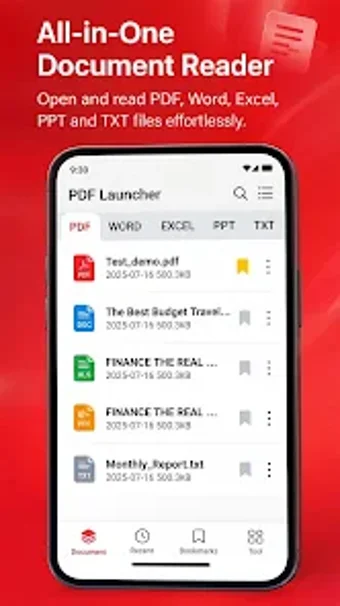
Open PDF Launcher - Scan & Reader, by Fitness On Phone, to centralize mobile document workflows for reading, scanning, and quick access. The app combines an offline document viewer and a smart camera scanner that converts photos to PDFs and handles PDF, Word, Excel, and PowerPoint files with fast loading times. It also installs a launcher-style home screen module for one-tap shortcuts, bookmarks, and search. Students, freelancers, and professionals get a lightweight document hub for on-device file management and quick review.
What does PDF Launcher do?
PDF Launcher bundles a document viewer, smart scanner, and a launcher-style desktop for quicker file access. Supported formats include PDF, Microsoft Word (DOC/DOCX), Excel (XLS/XLSX), PowerPoint (PPT/PPTX), and plain text. The scanner offers edge detection to digitize paper, and an image-to-PDF converter imports multiple gallery photos into a single document. The app also provides search, rename, delete, and share tools for local file management.
Does it slow down your system during scans and heavy viewing?
The app is designed with a lightweight profile and fast performance, and it claims zero-latency opening for large PDFs. In addition, offline operation keeps document processing on-device, avoiding network overhead. Performance notes include compatibility with most modern Android devices and a focus on low RAM use during operations. One-tap shortcuts reduce repeated file navigation, limiting background activity when accessing recent items directly from the home screen.
Is the app safe for sensitive documents and easy for non-technical users?
Privacy is a core design point, the app stores files locally and supports offline reading and scanning, which reduces cloud exposure. Reading enhancements such as dark mode, smooth scrolling, and bookmarking simplify review, and built-in file tools let users manage documents without extra utilities. Moreover, the optional launcher interface can replace or augment the home screen so casual users can access recent or bookmarked files with a single tap.
Suitable for on-device productivity, with a launcher trade-off
PDF Launcher is a compact, local document hub, combining on-device scanning, format viewing, and one-tap desktop access that benefits students and mobile professionals. The single clear trade-off is the optional launcher module that can replace the home screen, which may disrupt established layouts and require users to accept interface changes. For those who keep a standard desktop, this is the main usability decision.